Office & Work

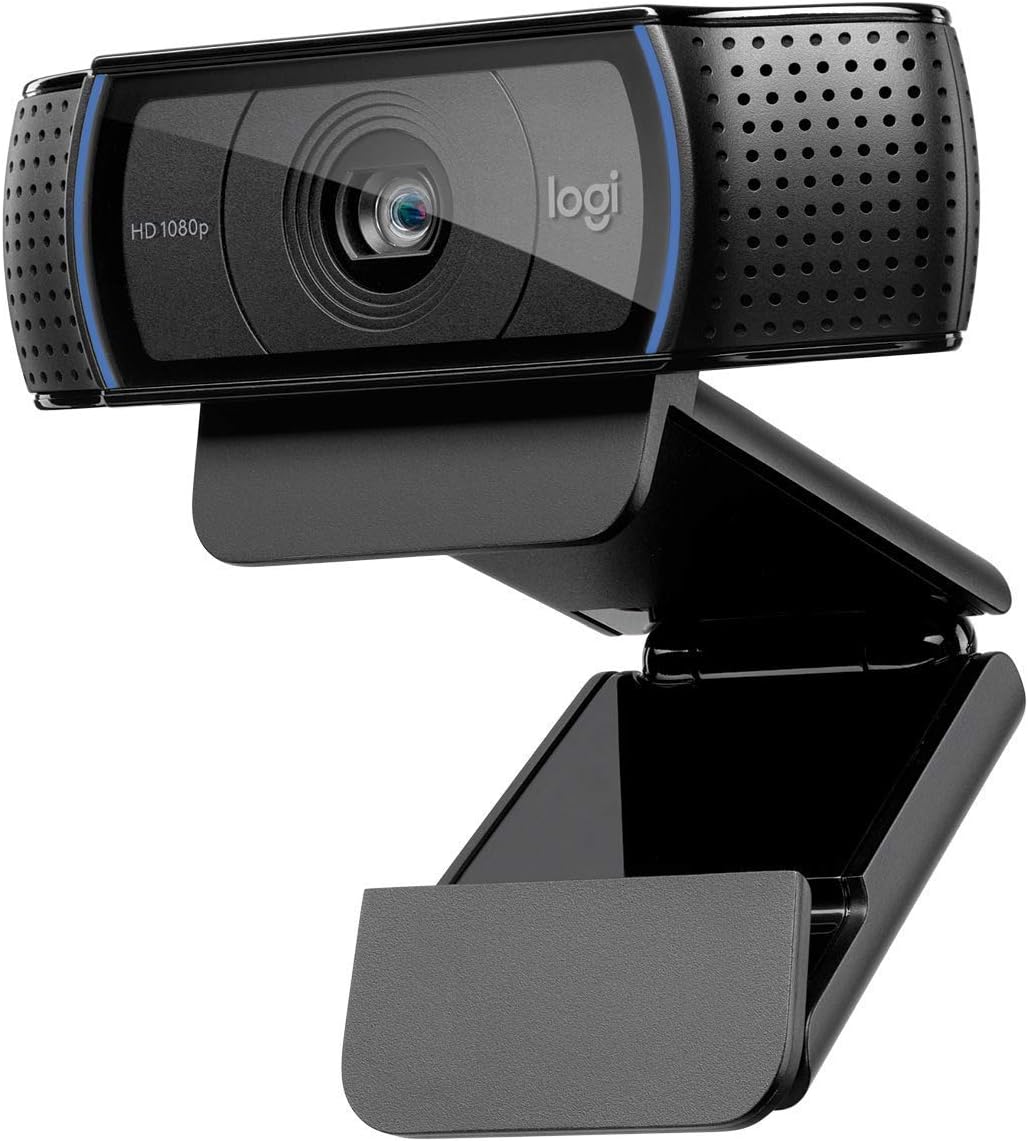
Logitech C920 HD Pro Webcam, 1080p/30fps

Webcams

The Logitech C920 HD Pro Webcam (ASIN B006JH8T3S) is a 1080p/30fps USB webcam with dual microphones and RightLight 2 auto-correction, certified for Zoom, Teams, and Meet, available on Amazon.ca at around $89 CAD.

ClearPick Score
8.8 / 10
Very Good
Value
9.5
Video Quality
9
Compatibility
9.5
Plug-and-Play
9.5
Low Light
8.5
As an Amazon Associate, ClearPick earns from qualifying purchases at no extra cost to you.
Logitech C920 HD Pro Webcam, 1080p/30fps product photo
Webcams
Logitech C920 HD Pro Webcam, 1080p/30fps
~$89 CAD est. on Amazon.ca
View on Amazon.ca โ†’Opens Amazon.ca ยท Affiliate link
โœ… Ships to Canada
โœ… Prime eligible (most orders)
โœ… 30-day Amazon returns
โœ… No extra cost to you

โœ… What Works

  • The C920 is the most proven webcam at any price point โ€” over a decade on the market with consistent video quality that made it the default recommendation for remote work during the 2020 home office shift. At $89 CAD, it delivers genuine 1080p quality that makes a visible difference over any built-in laptop camera.
  • Plug-and-play USB setup works identically on Windows, Mac, and ChromeOS without driver installation. Every major video conferencing platform โ€” Zoom, Teams, Google Meet, Webex โ€” recognizes it immediately as a certified device.
  • The RightLight 2 automatic light correction adjusts exposure and white balance in real time, which makes the image usable in mixed or challenging lighting conditions like backlit home offices without manual adjustments.
  • The dual omni-directional microphones pick up voice from a natural desk distance without requiring the user to lean toward the camera. Combined with the 1080p video, it eliminates the most common audio-visual issues in video calls for most home office setups.

โš ๏ธ Worth Knowing

  • RightLight 2 automatic exposure can make the image look somewhat flat or over-corrected in environments with strong contrast lighting. Users who want more control should look at the C920s or C922 which offer manual control options through Logitech's Camera Settings software.
  • The 78ยฐ field of view captures a single person at a desk comfortably but doesn't show the full room. If you need to show a wider environment (classrooms, group presentations from a single camera), the C930e with its 90ยฐ field of view is better suited.
  • The C920 doesn't include a privacy shutter โ€” there's no physical cover for the lens. Privacy-conscious users should budget for a separate lens cover or consider the C920s which includes a built-in privacy shutter.
  • The built-in microphone is serviceable for video calls but noticeably inferior to a dedicated USB microphone like the Blue Yeti for recording or podcasting. For calls, the C920 mics are fine; for serious audio capture, pair it with a dedicated mic.

What Real Buyers Are Saying

What buyers love

โ€œ"My team immediately asked if I had upgraded my setup. I just added the C920. The difference between built-in laptop camera and this is night and day โ€” I look like I'm actually in a professional call."โ€

Source: Amazon reviewer

โ€œ"Plugged it into my work Mac and it appeared in Zoom settings instantly. No software, no setup. Was on a call in 90 seconds."โ€

Source: Reddit

โ€œ"The RightLight correction handles my backlit home office reasonably well. I'm not in perfect lighting conditions and I still look presentable on calls."โ€

Source: Amazon reviewer

โ€œ"Using this for two years with daily Teams calls and it has been flawless. No driver issues, no firmware problems, no degraded image quality over time."โ€

Source: Amazon reviewer

Common complaints

No privacy shutterโ€ฆ

Basic quality-of-life omission on a mainstream webcam. I put a sticky note over the lens when not in use. The C920s has a shutter โ€” should be standard on all models at this point.

Source: Amazon reviewer

Auto exposure can be flat in mixed lightโ€ฆ

RightLight 2 sometimes overexposes my face to compensate for a bright window behind me, making everything look washed out. Manual control would fix this but the C920 doesn't offer it easily.

Source: Reddit

No 4K optionโ€ฆ

1080p is perfectly sharp for video calls but in 2026 a 4K option would be appreciated for content creation use cases. The C920 is focused on video conferencing, not recording.

Source: Amazon reviewer

Clip grip can scratch thin monitor bezelsโ€ฆ

The plastic clip grip is slightly rough on the contact surfaces. Added felt pads to protect my monitor's bezel before installing. Should come with protective padding.

Source: Amazon reviewer
ClearPick Verdict

The Logitech C920 remains the best-value 1080p webcam for remote workers and video callers in Canada. Over a decade of production has produced a camera that's universally compatible, immediately recognizable to every major video platform, and reliably delivers image quality that makes built-in laptop cameras look terrible by comparison. The lack of a privacy shutter is a real omission but not a deal-breaker for most users. For anyone whose current webcam is their laptop's built-in camera, the C920 upgrade is immediate and obvious.